
KK8 provides several account-creation options for users entering the Malaysian platform. During our review, the registration interface displayed One-click, Phone and E-mail as separate signup methods, with Malaysia selected as the country or region.
This guide focuses specifically on KK8 registration and creating a new account. Existing-account access and forgotten credentials are covered in the KK8 Login guide, while APK installation, MYR payments, bonuses and casino games have their own dedicated pages.
The KK8 Create Account screen gives Malaysian users more than one route to registration.
The interface we reviewed displayed three tabs: One-click, Phone and E-mail. One-click was selected in the flow we examined, while Malaysia appeared directly below as the chosen region.
This makes the registration method an important choice at the beginning of account creation.
| Registration Feature | What We Observed |
|---|---|
| Country / Region | Malaysia |
| One-click Registration | Available |
| Phone Registration | Displayed |
| E-mail Registration | Displayed |
| Generated UID | Displayed in One-click flow |
| Generated Password | Displayed in One-click flow |
| Edit UID | Available in reviewed flow |
| Edit Password | Available in reviewed flow |
| Save UID and Password | Option displayed |
| Terms of Service | Acceptance stated |
| Privacy Policy | Acceptance stated |
| Existing User Login | Separate Log in option |
The screenshots confirm these interface elements but do not establish every verification requirement that may apply to every registration method.
A new user begins through the Register option rather than Log In.
The general registration process we observed is:
The exact steps can differ according to the selected signup method.
In particular, users should not assume that Phone and E-mail registration work identically to the One-click flow.
One-click is the registration method we were able to examine most closely.
With One-click selected, the registration page displayed Malaysia as the region and a large Register button.
After proceeding, KK8 presented a screen titled Your Account Details.
This screen contained a UID and password for the new account and provided controls for editing the displayed credentials.
The interface also stated:
You may create a new UID and password, or proceed with the default option.
This means the One-click flow we reviewed did not simply create an invisible account in the background. It showed the credentials before the user continued.
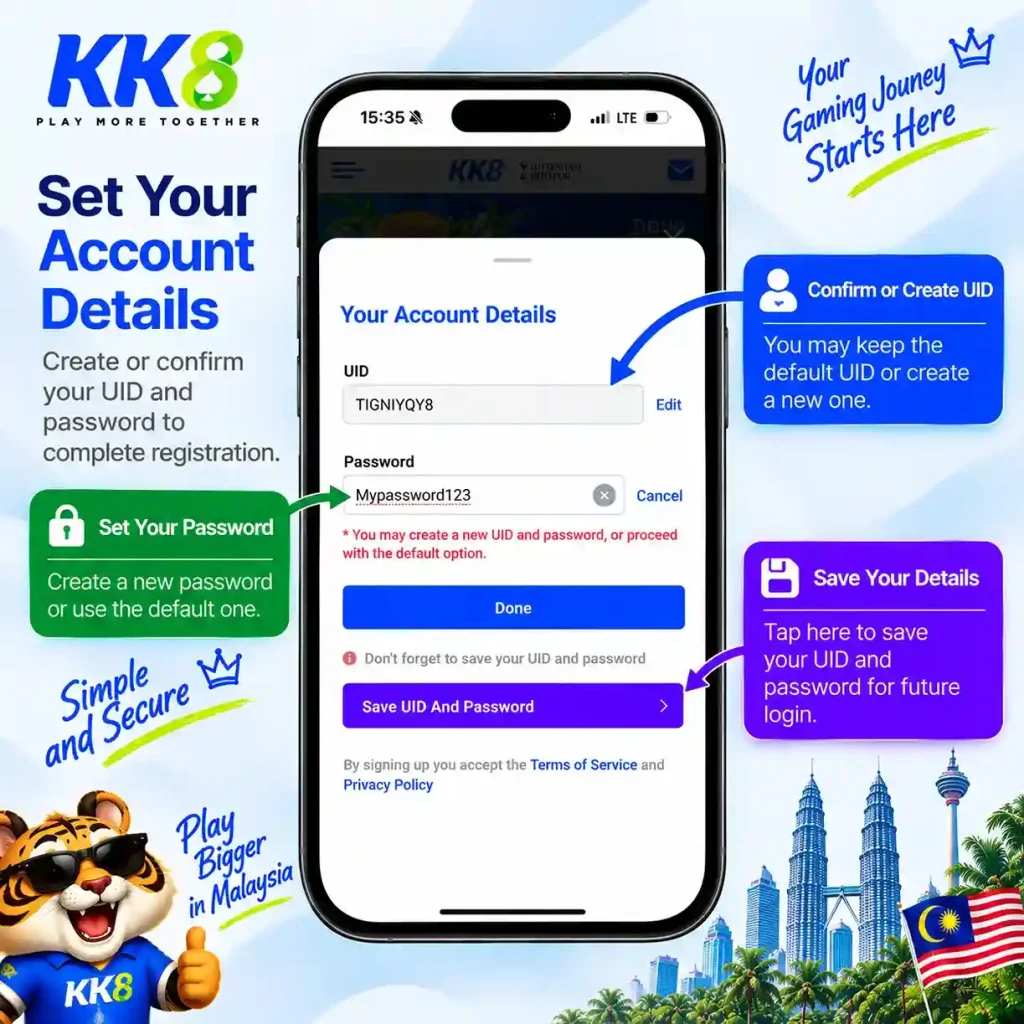
The One-click flow creates an account identifier shown as a UID.
The UID is important because the KK8 account environment continues to display it after registration. In the Profile screen we reviewed, the UID appeared alongside the Main Wallet and MYR balance.
Users should therefore treat the UID as account information that may be needed again.
It should not be confused with a nickname, promo code, transaction reference or wallet balance.
In the One-click flow we reviewed, an Edit control appeared next to the generated UID.
The page also explicitly stated that the user could create a new UID and password or continue with the default option.
This provides an opportunity to review the generated account details before completing the process.
However, this should not be interpreted as proof that a UID can always be changed later from the Profile section.
Our screenshots confirm editing during the reviewed registration stage, not unrestricted UID changes after account creation.
The same account-details screen displayed a generated password.
An editing control was available for the password as well.
Users who replace the generated password should choose credentials they can retain securely without reusing an important password from another service.
After registration, the Profile section we reviewed also contains a separate Change Password option.
That later password-management feature is different from editing the initial credentials during signup.
KK8 places noticeable emphasis on saving the credentials created through One-click registration.
The screen we reviewed displayed:
Don’t forget to save your UID and password
It also provided a Save UID And Password option.
This is an important part of the signup process.
A user who remains signed in on the same device may initially feel that the credentials are unnecessary. However, they can become important after logging out, clearing browser data, changing phones or reinstalling an application.
Saving the credentials securely at registration is easier than trying to reconstruct them later.
Phone was displayed as a separate registration option alongside One-click and E-mail.
This confirms that a phone-based signup route was present in the Malaysian Create Account interface during our review.
However, the supplied screenshots do not show the Phone form after that tab is selected.
We therefore do not claim a specific Malaysian phone-number format, OTP procedure, SMS verification requirement or password rule without seeing the corresponding form.
Those details should be taken from the current registration interface when Phone is selected.
E-mail was also displayed as a separate registration option.
As with Phone registration, this confirms the availability of the option in the interface we reviewed but does not reveal every field or verification stage behind it.
We therefore do not state that e-mail verification is mandatory, instant or unnecessary.
Users selecting E-mail should follow the fields and instructions presented by the current form.
The most important difference is that these are separate signup routes rather than three names for the same button.
| Method | Confirmed From Our Review |
|---|---|
| One-click | Available and complete credential flow observed |
| Phone | Registration tab displayed |
| Registration tab displayed | |
| One-click UID | Generated and displayed |
| One-click Password | Generated and displayed |
| Phone Verification | Not confirmed from supplied screenshots |
| E-mail Verification | Not confirmed from supplied screenshots |
One-click is therefore the method about which we can make the most detailed evidence-based observations.
For Phone and E-mail, we avoid filling missing steps with assumptions.
Malaysia was directly displayed on the Create Account screen we reviewed.
The broader KK8 region selector also showed Malaysia, Singapore and Bangladesh, with Malaysia selected for our main review.
Account region matters because platform settings, currency and payment options can differ between markets.
The Malaysian account environment we subsequently examined displayed its Main Wallet in MYR.
For that reason, this registration guide is written specifically around the Malaysia/MYR environment rather than assuming every regional version of KK8 is identical.
Registration is only for creating a new account.
Users who already have an account should use Log In.
KK8 itself makes this distinction visible. The main interface displayed separate LOG IN and REGISTER controls, while the Create Account page also included:
Already have an account? Log in
| Register | Log In |
|---|---|
| Creates a new account | Accesses an existing account |
| Offers One-click, Phone and E-mail | Uses existing account credentials |
| Establishes account details | Returns to existing profile and wallet |
| Relevant to new users | Relevant to existing users |
| One-click can generate UID/password | Existing UID/password should be retained |
Creating another account is not an appropriate substitute for recovering access to an existing one.
After selecting One-click and proceeding with Register, the flow we reviewed presented the new account credentials.
The user could retain or edit the UID and password before selecting Done.
The screen also provided a separate option for saving those credentials.
Once the account is active, the normal KK8 environment provides access to the gaming lobby and account Profile.
The Profile we reviewed displayed the UID again together with the MYR Main Wallet.
After account creation, Profile becomes the main area for account administration.
During our review it displayed the UID and MYR wallet together with Deposit and Withdraw controls.
Under My Account, KK8 showed:
Profile, Change Password, Transaction History and Withdrawal Details.
The General section also contained Code Redemption and Contact Us.
These are post-registration account functions. They should not be confused with fields that must necessarily be completed during signup.
The registration screenshots do not show a deposit as a required step for creating the One-click account.
Deposit functionality exists separately within the account wallet.
We therefore distinguish creating an account from funding an account.
A user should not assume that choosing Register automatically initiates a deposit.
Payment methods, deposit limits and withdrawals are covered separately in the KK8 Payments guide.
The Malaysian account we reviewed used MYR for the Main Wallet.
MYR amounts were also displayed in the cashier and promotional interface.
However, registration itself should not be treated as a payment transaction.
The purpose of signup is to establish the account. Deposit decisions can be made separately after the account environment is available.
The supplied registration screenshots do not establish a complete KYC procedure.
We therefore do not claim that identity verification is always required immediately during signup, nor do we claim that users can always register and withdraw without verification.
Verification requirements can arise according to account, transaction or compliance circumstances.
If KK8 requests identity or account information, users should review the current request and applicable terms rather than relying on unsupported claims about when KYC “always” happens.
Phone and E-mail registration imply different ways of establishing an account, but the complete forms were not included in the material we reviewed.
Users should provide accurate information where the current registration process requires it.
Incorrect account information can create problems later if account ownership, payments or access need to be verified.
At the same time, users should only provide sensitive information through the intended account process and should be cautious with unrelated third parties asking for credentials.
The registration interface directly links signup with acceptance of KK8’s terms.
The screen we reviewed stated:
By signing up you accept the Terms of Service and Privacy Policy.
Users should therefore review those documents before completing registration.
Creating an account can establish rules relating to account use, promotions, payments and other platform activity.
The existence of a Register button should not be treated as a substitute for reading applicable conditions.
Privacy Policy was also directly linked from the Create Account screen.
This is relevant because different registration methods may involve different account information.
For example, One-click, Phone and E-mail are presented as separate options.
Users who want to understand how account information is handled should review the current privacy terms before providing personal details.
Promo-related functionality exists within KK8, but it is separate from the core registration process we reviewed.
The deposit interface contained a Promo Code field, and the Profile section displayed Code Redemption.
This does not establish that every new registration needs a promo code.
It also does not prove that one universal registration code provides a permanent bonus.
Promo codes, free-credit searches, Daily Check-In and other rewards belong to the KK8 Bonus guide.
Nothing in the One-click registration flow we reviewed indicates that a promo code is required simply to create the account.
The account was created through the registration process and credentials were then displayed.
Code-related functionality appears elsewhere in the platform.
Users should therefore distinguish an optional or campaign-specific promotional code from the core account credentials required for access.
Some searches around KK8 and similar casino products combine registration with terms such as free credit or no deposit.
Search demand alone does not prove that a particular reward is currently available.
Our review confirms that KK8 has Promotion, Code Redemption, VIP and Daily Check-In functionality. We also observed a time-limited Daily Check-In campaign.
That evidence is not sufficient to claim that every new KK8 registration automatically receives free credit.
Always check the current promotion and its requirements separately from the signup process.
A registration and a bonus are two different things.
Creating an account establishes access to KK8. A promotional reward can have additional eligibility conditions, validity dates, wagering rules or campaign requirements.
We therefore do not insert an unsupported fixed “new member bonus” amount into the registration instructions.
If a promotion is displayed after registration, its current terms should determine whether the account qualifies.
Detailed promotional analysis belongs to the Bonus page.
The KK8 interface includes a separate Check In section.
During our review, it displayed a Pragmatic Play Daily Check-In campaign with different MYR amounts across consecutive days.
However, the screen also displayed Requirements and showed Requirement Not Met for the reviewed account.
Creating an account should therefore not be presented as automatically qualifying a user for the displayed check-in amounts.
Registration and promotional eligibility remain separate.
VIP Club was visible in the account menu.
Its presence confirms a VIP-related section but does not mean a newly registered user automatically receives a particular VIP status or reward.
We have not verified the complete VIP progression rules from the supplied screenshots.
For that reason, this registration page does not invent tier thresholds, cashback percentages or qualification amounts.
The registration interface we reviewed was presented in a mobile-friendly environment.
One-click, Phone and E-mail appeared as selectable registration methods, with the main Register control clearly visible.
This does not mean registration requires an Android APK.
Account creation and application installation are separate processes.
Users looking specifically for Android installation, updates or APK troubleshooting should use the KK8 APK guide.
An APK is an Android application package, while registration is the process of creating an account.
They should not be treated as the same task.
The registration evidence we reviewed does not establish that installing an APK is mandatory before a Malaysian user can create an account.
Users should use the registration route available through their current KK8 access method.
APK-specific instructions belong on the App page.
If no KK8 account exists yet, registration can establish a new account on the current supported device.
If an account already exists, changing devices should normally be treated as a login situation instead.
This distinction is especially important for One-click users.
Creating another One-click account because the previous device is unavailable can leave the user with multiple sets of credentials instead of restoring the original account.
Keep the original UID and password securely available when possible.
Registration problems can occur at different stages, so the first step is identifying where the process stops.
If the Register button does not proceed, check the connection and any message displayed by the current form.
If Phone or E-mail registration rejects information, review the field requirements shown on that specific registration tab.
If One-click registration has already produced a UID and password, avoid restarting the entire signup process before determining whether the account has already been created.
A non-responsive Register button can be caused by a temporary interface or connection issue.
Check that the required selections or fields on the current form have been completed.
Reloading the page or reopening the mobile environment can help with a temporary session problem.
If the problem persists, the KK8 interface provides customer-support access that can be used to describe the issue.
Do not repeatedly submit the form without knowing whether earlier attempts created an account.
If One-click registration has already generated credentials but they were not saved, first determine whether the account remains accessible through the current session.
If Profile is still available, the UID may be visible there.
The password itself should not be assumed to remain visible after registration.
If access is lost, use the current account-support or recovery process rather than repeatedly creating new One-click accounts.
The Login guide covers lost credentials in more detail.
If the registration page loads slowly or fails to proceed, check the device’s internet connection.
Closing and reopening the browser or application may resolve a temporary session problem.
If the problem is specific to an installed Android application, check whether the app itself requires an update.
Do not confuse an APK installation problem with a registration-form problem; they are different troubleshooting paths.
Users should not assume that multiple registrations are permitted simply because One-click makes account creation convenient.
Account rules and promotion terms can restrict how accounts are used.
Creating additional accounts can also complicate login credentials, transaction records and bonus eligibility.
If the reason for another registration is that an existing account cannot be accessed, account recovery is more appropriate than automatically creating a replacement.
Account security begins during signup.
Store the UID and password securely and avoid sharing them with other people.
If choosing a custom password, do not reuse a password associated with e-mail, banking or other important accounts.
The generated credentials should also not be posted publicly when asking for help.
After account creation, the Profile section provides a Change Password option if the password later needs to be replaced.
One-click registration reduces the amount of information required at the beginning of the flow, but this makes credential management particularly important.
A user who does not remember the generated UID may have less obvious information to refer back to later.
KK8 itself highlights this by reminding users to save the UID and password.
Store them somewhere private and secure rather than relying indefinitely on a browser or app remaining logged in.
Creating an account does not create an obligation to deposit or gamble.
Before using real-money casino or sports products, decide what amount can be treated as entertainment spending without affecting essential expenses.
Promotions should not determine the budget.
If the main reason for registering is a free-credit or VIP offer, review the conditions first rather than increasing spending simply to qualify for a reward.
Responsible Gaming is covered in a dedicated guide.